This Site: Vibe Architecting, Vibe Designing, and Vibe Coding a Personal Brand
Problem
The site had to prove six things at once (AI, design, coding, SEO, marketing, and accessibility) without looking like the generic output AI tools default to. It also had to stay content-first and editable without a CMS, carry a real career's worth of proof (case studies, twelve recommendations, five book notes), and be fast and accessible enough to stand behind my own accessibility work. The risk was obvious: ask an AI for a nice website with no system underneath and you get gradient blobs, stock imagery, and identical three-icon grids.
Approach
- Vibe Architecting: gathered everything first (resume, LinkedIn export, projects, certifications, books, apps) inside a Claude Project, then agreed the sitemap, the job of each page, and the stack before any visual decision was made.
- Vibe Designing: wrote a Design.md specification as the single source of truth for the visual system, including an explicit list of banned AI-slop patterns.
- Vibe Coding: built the real site directly from that specification. I skipped the mockup-translation step I used on Nijilvasukutty.co.uk (spec, then Google Stitch, then rebuild in code), so what I reviewed at every step was rendered code, not an approximation of it.
- Verify and ship: production build, route-by-route checks, then deployment, with Lighthouse run against the live URL.
UX view
- Audience and jobs to be done: recruiters and hiring managers scanning for proof, founders and incubators assessing credibility, and clients deciding whether to get in touch. Every page answers one of those questions.
- Information architecture: a flat navigation with no dropdowns, Contact held out as a persistent call to action instead of a nav item, and one consistent case study structure (problem, approach, outcome) so comparison is effortless.
- Two kinds of copy, deliberately separated: identity copy (hero, About) is written for emotion, story, and trust, while proof copy (case studies, Journey) stays factual and quantified.
- Honesty as a UX rule: no invented testimonials or numbers. Until the real LinkedIn recommendations and book notes were supplied, those pages carried honest placeholders instead of fabricated content.
- Interaction: a custom mobile menu that closes on link click, route change, and Escape, and a current-page indicator that uses weight and underline with aria-current, not colour alone.
UI view
- Greyscale token system: an ink ramp for text, a line colour for rules, and two surface tones. Hierarchy comes from type scale, weight, and whitespace, not colour. A single optional accent was defined but intentionally left unused.
- Typography: Fraunces for editorial display, IBM Plex Sans for body, and IBM Plex Mono for metadata and pillar tags, avoiding the default all-sans look. Sizes use a fluid clamp() scale (display runs from about 40px on mobile to 80px on desktop) so there are no breakpoint jumps.
- Layout: an 8px spacing scale, a narrow prose measure of roughly 70 characters for long reading, and a wider shell for media and section frames.
- Components: pillar tags as thin-bordered mono pills, a large-numeral metric callout for headline results, and text-led case study rows instead of a thumbnail grid.
- Restraint: no gradients, no stock photography, no testimonial carousel, and no motion beyond subtle transitions, with prefers-reduced-motion respected. The hero uses one optimised JPG illustration, and the header is a frosted sticky bar.
Developer view
- Stack: Next.js 15 App Router, TypeScript, and Tailwind CSS 3, with static generation for every route and generateStaticParams for the case study pages.
- Content as typed data: all copy lives in typed files under src/content, so adding a case study is one object, with optional fields for metrics, resources, and images. No CMS, database, or runtime fetching.
- SEO: per-page metadata through the Metadata API, a generated sitemap and robots file, Person structured data (JSON-LD) site-wide, and a single canonical domain.
- Performance and privacy: fonts self-hosted through Fontsource packages instead of a third-party font request, static HTML output, and optimised images.
- Accessibility: semantic landmarks and heading order, visible focus states, sufficient contrast from the greyscale palette, and keyboard-operable navigation.
- Delivery: source in Git on GitHub, built and deployed on Netlify with the Next.js plugin, with the default netlify.app address 301-redirected to the canonical domain so it never competes in search results.
Outcome
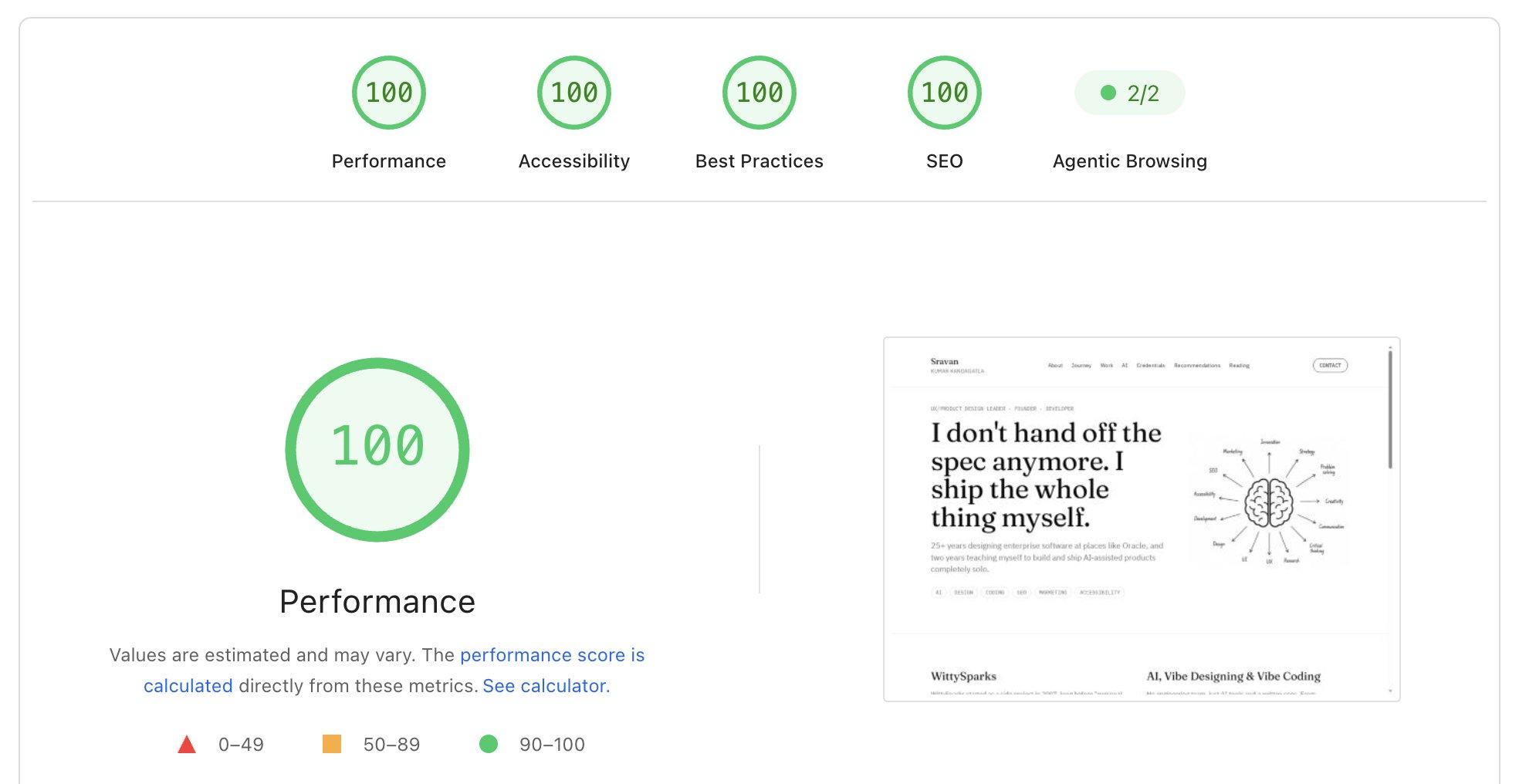
A fast, accessible, search-ready personal site that proves AI-assisted design and development can produce production-grade work. Lighthouse scores 100 for Performance, Accessibility, Best Practices, and SEO, and passes 2 of 2 Agentic Browsing checks. The biggest lesson: the written specification is the product. Clear constraints, not a better model, are what stop AI output looking like AI output.